Introduction
Buying your first crypto is less about clicking the right button and more about understanding where you are buying, who holds your money while you do it, and what you can do afterwards. This lesson walks through the main ways to buy and then follows one complete example, step by step: creating an account on an exchange, securing it, adding funds and making a first purchase. Moving what you bought to a wallet you control is covered in a separate self-custody lesson.
The example uses MEXC, a global exchange. It is there to show how the process works, not as a recommendation: every platform has its own menus, rules and availability, and all of them change over time. What stays the same from one platform to another is the logic, and that is what you will learn here.
By the end of this lesson you will be able to tell the main ways of buying crypto apart, explain the difference between a service linked to your country and a global one, follow the full flow from account to first purchase, and compare the ways of adding funds (Pix, card and peer to peer) by their real cost and implications.
Ways to Buy
There is no single place to buy crypto. In practice, most beginners use one of three paths, and each one trades convenience, cost and risk in a different way.
None of them is "the right one". On an exchange, adding funds usually happens through Pix or bank transfer, by card, or by P2P, and each has different costs and implications (covered below). For people who already know the market, P2P tends to add little: the price is rarely better than buying directly, and you take on the risk of dealing with another person. An app is the quickest way to buy a small amount without learning anything else. This lesson focuses on the exchange, because it teaches how the market actually works.
Crypto Has No Borders
Crypto networks do not belong to any country: anyone with an internet connection can use the same network. The companies that offer services on top of those networks are a different story. Each one is established somewhere, follows the rules of the place where it operates, and chooses which countries it serves.
That creates two broad groups. Services linked to Brazil usually have a company in the country or clearly aim at Brazilians: support in Portuguese, a .br domain, local advertising, local payment methods or partnerships with Brazilian companies. Global services operate from other countries, often have no office here and answer to the rules of where they are established, even when Brazilians use them every day.
Pix shows why this is not obvious. Pix only means that money moves between Brazilian bank accounts. When you buy in a P2P market, you send Pix to another person, while the platform, which may be based abroad, only holds the crypto during the trade. Paying with Pix does not make a global service local, and a service that accepts Pix is not automatically Brazilian: what counts is who runs it and where.
One practical consequence is reporting. Platforms considered to operate in Brazil report their users' operations to the Receita Federal under the rules in force. A global platform without that link does not do it for you, so the record of your purchases, sales and transfers (dates, amounts and values in reais) is yours to keep, and Brazilian regulation also sets duties for people who use foreign platforms. The current framework is the DeCripto (IN RFB 2.291/2025), which replaces the older IN RFB 1.888/2019. Rules change often, so check the current ones with the Receita Federal or with an accountant who knows crypto.
Key takeaway: before using any platform, find out which company runs it, where it is based, which countries it serves and who answers to you if something goes wrong.
How an Exchange Works
An exchange is a marketplace where buyers and sellers meet. When you deposit money, the exchange credits a balance on its own books. That balance is a claim on the company: until you withdraw, the company, not you, controls the private keys of the assets. That is why the lessons on wallets insist on the idea of self custody.
Assets on an exchange are traded in pairs, written like BTC/USDT. In that pair, you buy BTC (the first asset) and pay with USDT (the second). USDT is a stablecoin that tracks the US dollar, which is why many exchanges ask you to get a stablecoin first and then use it to buy other assets.
This lesson covers only spot trading, which means buying and selling the real asset at the current price. Products such as futures and leverage are a different matter, with risks that do not belong in a first purchase.
Account, Security and Verification
The next three sections follow the same example from the start. First, the account itself: creating it, protecting it and verifying your identity. Do these steps in this order, because a protected account is the foundation for everything else.
Step 1. Create the account
On the official site or app, sign up with an e-mail or phone number and a strong password, then confirm the code you receive. Type the address yourself or use a bookmark you created: never trust a link from an ad or a message.
Create your account on MEXC ↗ referral link
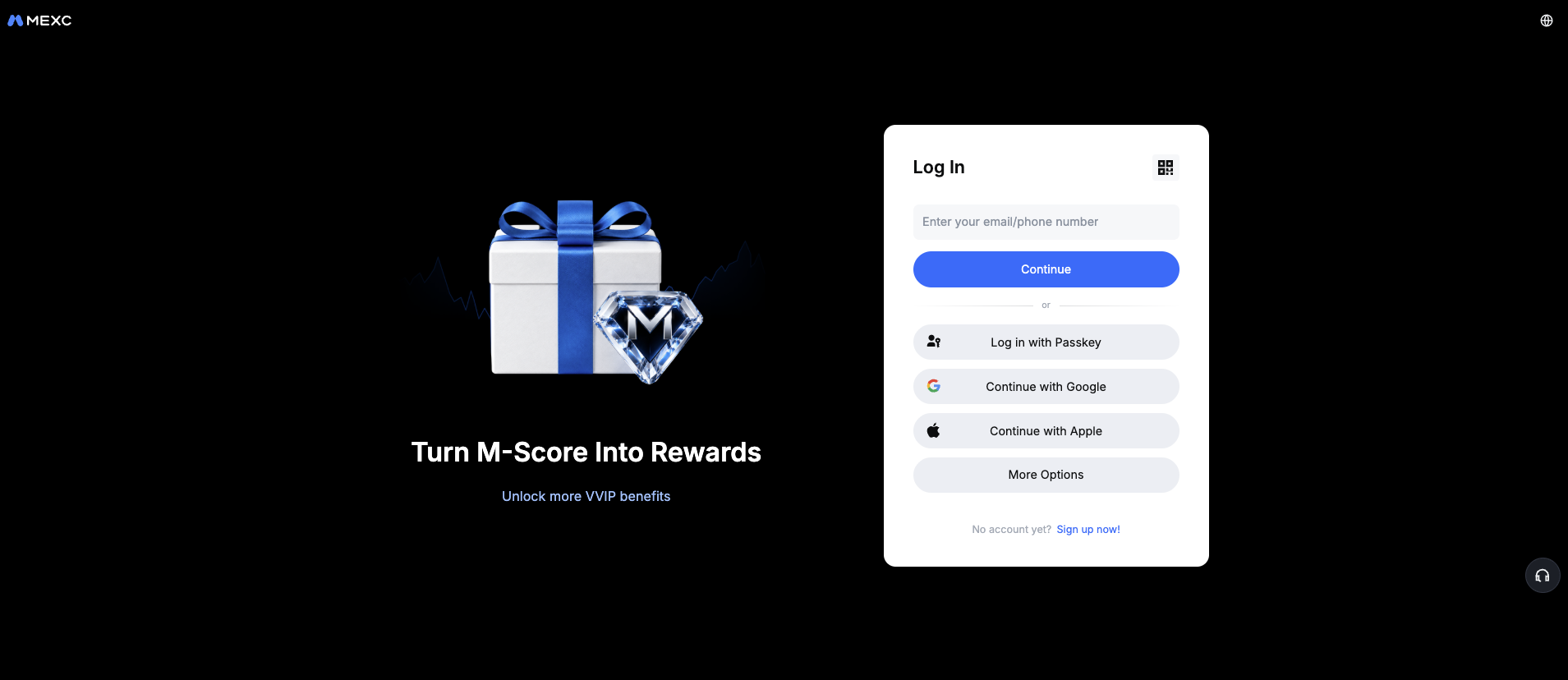
- 1The address bar: type the official address yourself or use a bookmark you created, never a link from an ad or a message.
- 2Your email: use one that only you access and that is protected with its own two-step verification.
- 3A strong password that you do not use anywhere else: a password manager helps.
- 4Confirm the code sent to your email to finish creating the account.
Step 2. Secure the account before adding any money
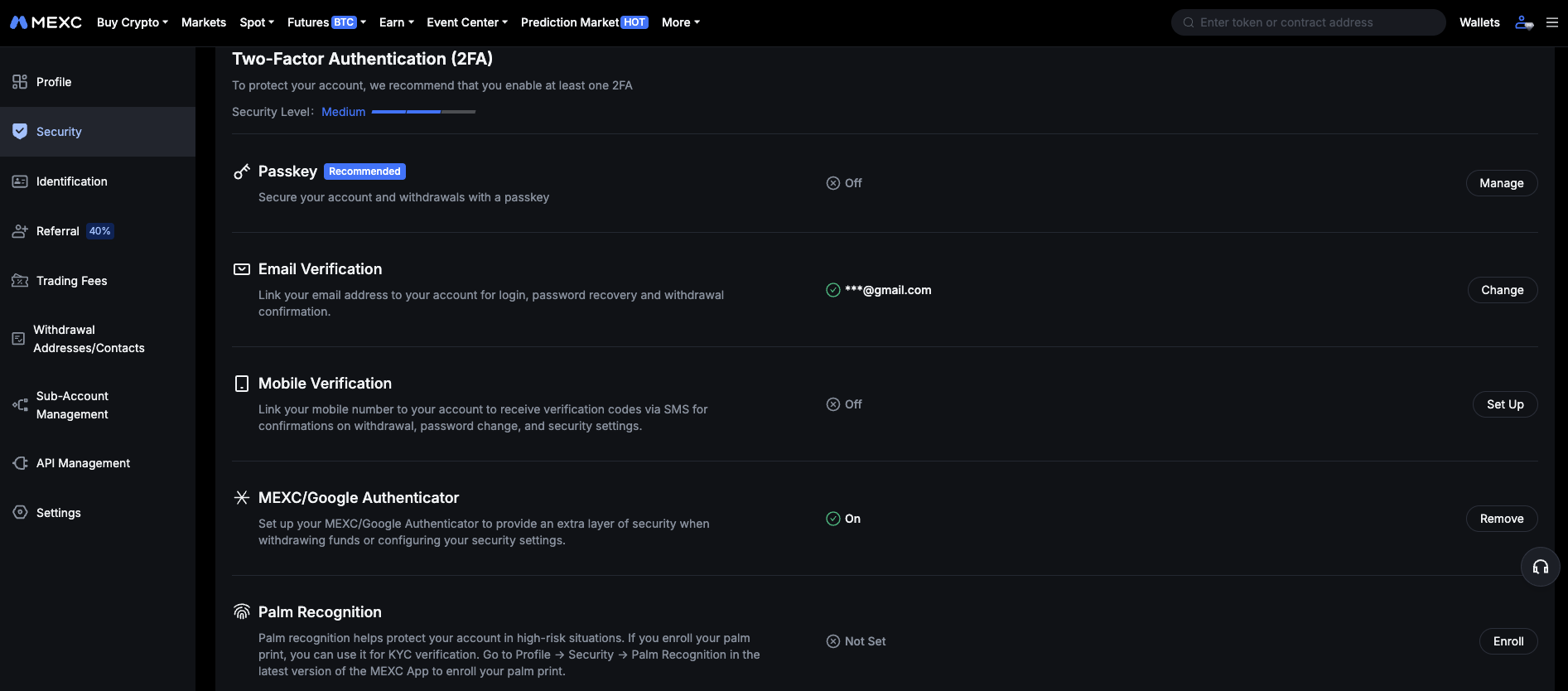
- 1Two-step verification with an authenticator app. Prefer it over SMS, which can be hijacked with a SIM swap.
- 2An anti-phishing code appears in every genuine email from the platform. If it is missing, the email is fake.
- 3A whitelist (when offered) lets withdrawals go only to addresses you approved in advance.
- 4Check from time to time which devices are logged in, and remove the ones you do not recognize.
Step 3. Verify your identity (KYC)
KYC stands for "know your customer". Platforms ask for it to meet regulations and to fight fraud, and most features stay limited until it is done. Send your documents only through the official site or app, and never to someone who contacts you offering to "speed up" the verification.
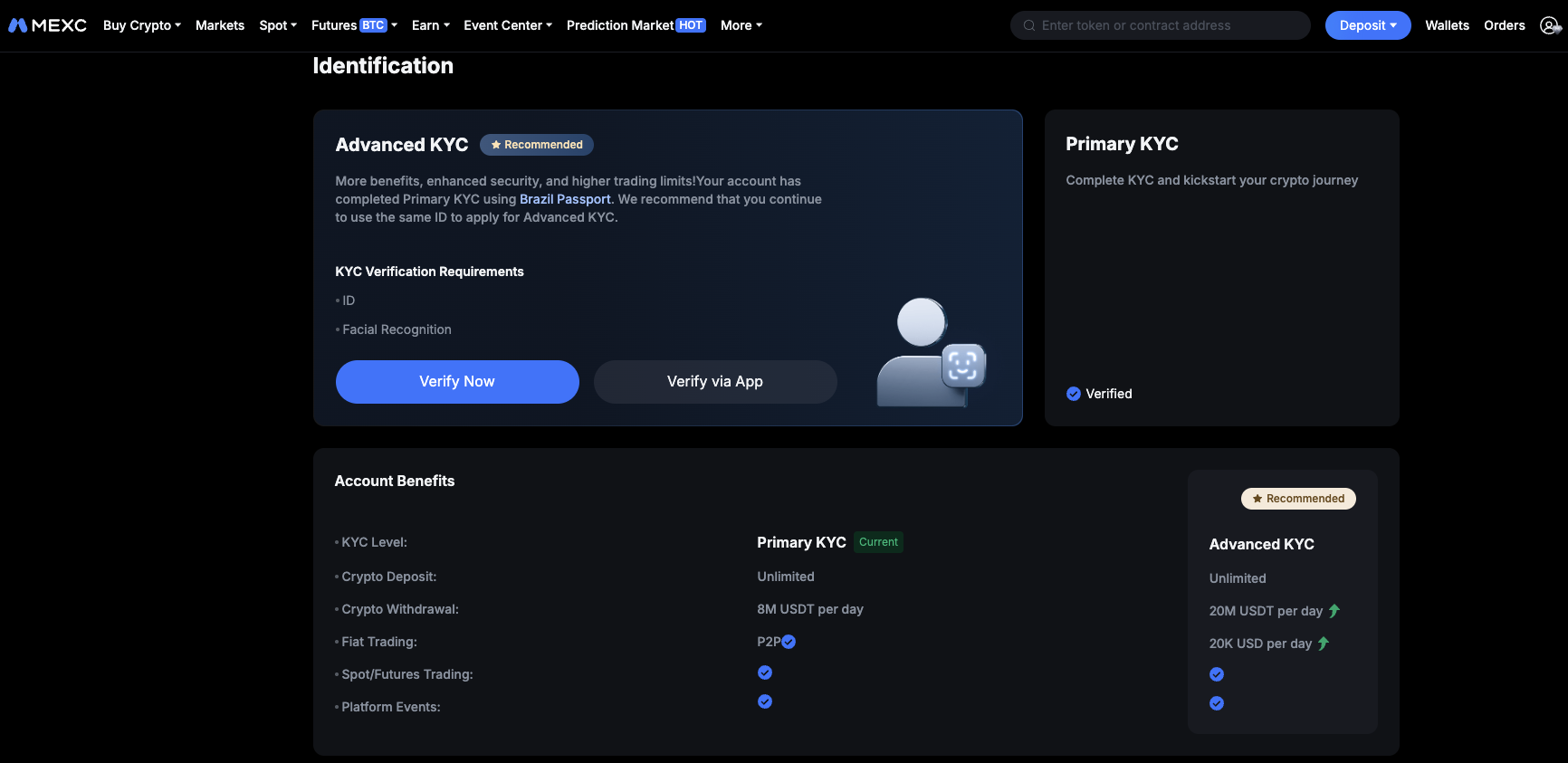
- 1A photo of an official ID document. Use a sharp, well lit photo with all four corners visible.
- 2A selfie, so the platform can match your face with the document.
- 3The review can take minutes or days. Until it finishes, some features stay limited.
Adding Funds
To buy, you need a balance on the platform. There are a few common ways to add it, and each has different implications for cost, speed, limits and, as seen in "Crypto Has No Borders", for who is on the other side of the payment. What you see depends on the platform, your country and your account, and it changes over time, so always check inside the app before planning.
Step 4. Add funds
Before choosing, compare:
- The total cost, not only the displayed fee: compare the rate you get with a reference price at that moment.
- Limits and time to credit, which are usually lower and slower for new accounts.
- Who receives your payment, and whether the paying account has to be in your name.
- The records you keep: receipts, dates and amounts in reais are part of your history, as seen in "Crypto Has No Borders".
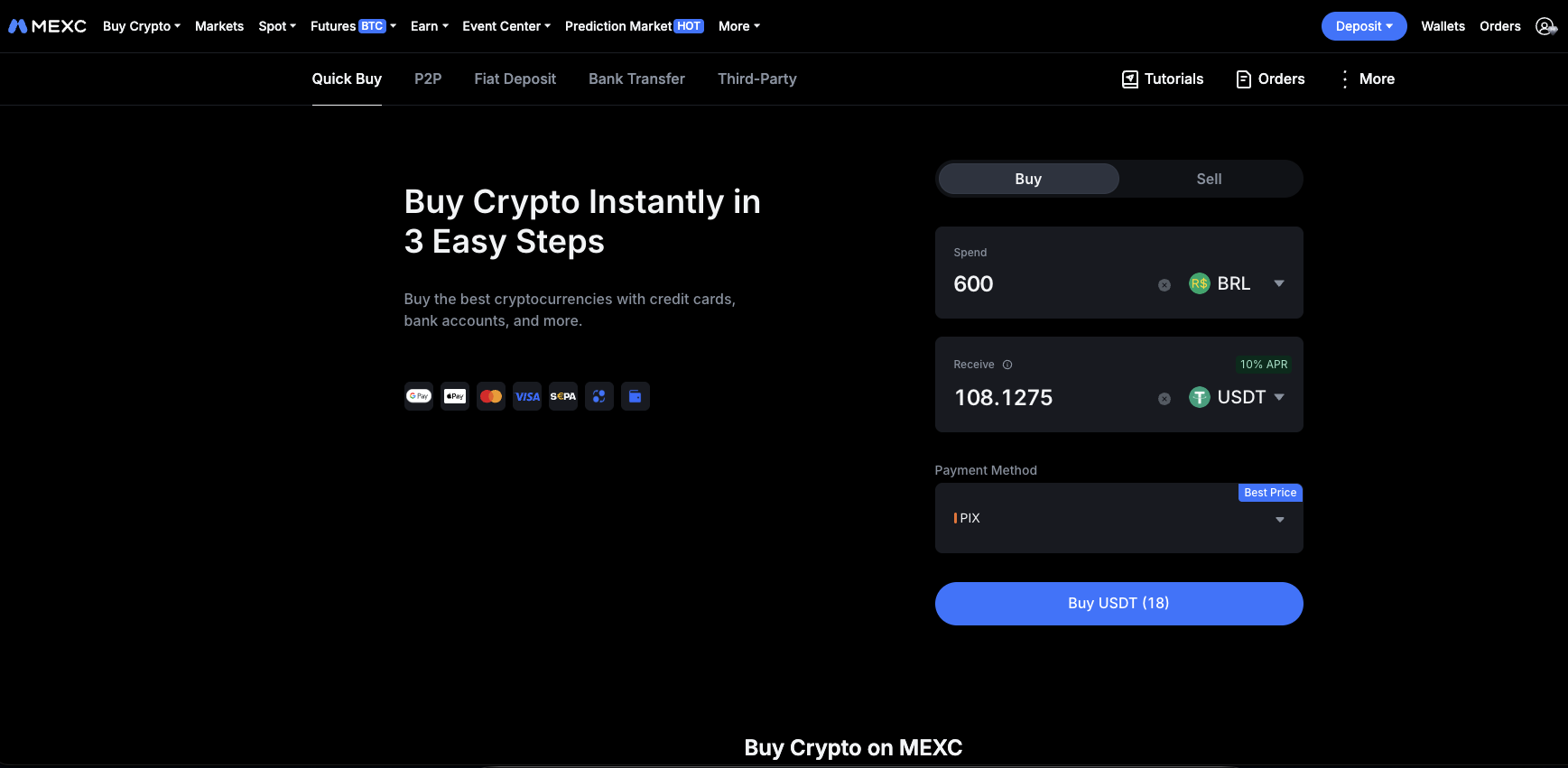
- 1Find the area to buy crypto or add funds.
- 2Choose your currency and the payment method offered to you (Pix, card or others).
- 3Enter the amount and check the quantity you will receive and the total cost before confirming.
- 4Complete the payment on the page shown and wait for the balance to be credited. Do not close the page before it ends.
Buying on the Spot Market
Step 5. Buy on the spot market
With a balance in the account (for example, in USDT), you can buy the asset you want on the spot market. Choose the pair, decide the order type, enter an amount, review the fee and confirm.
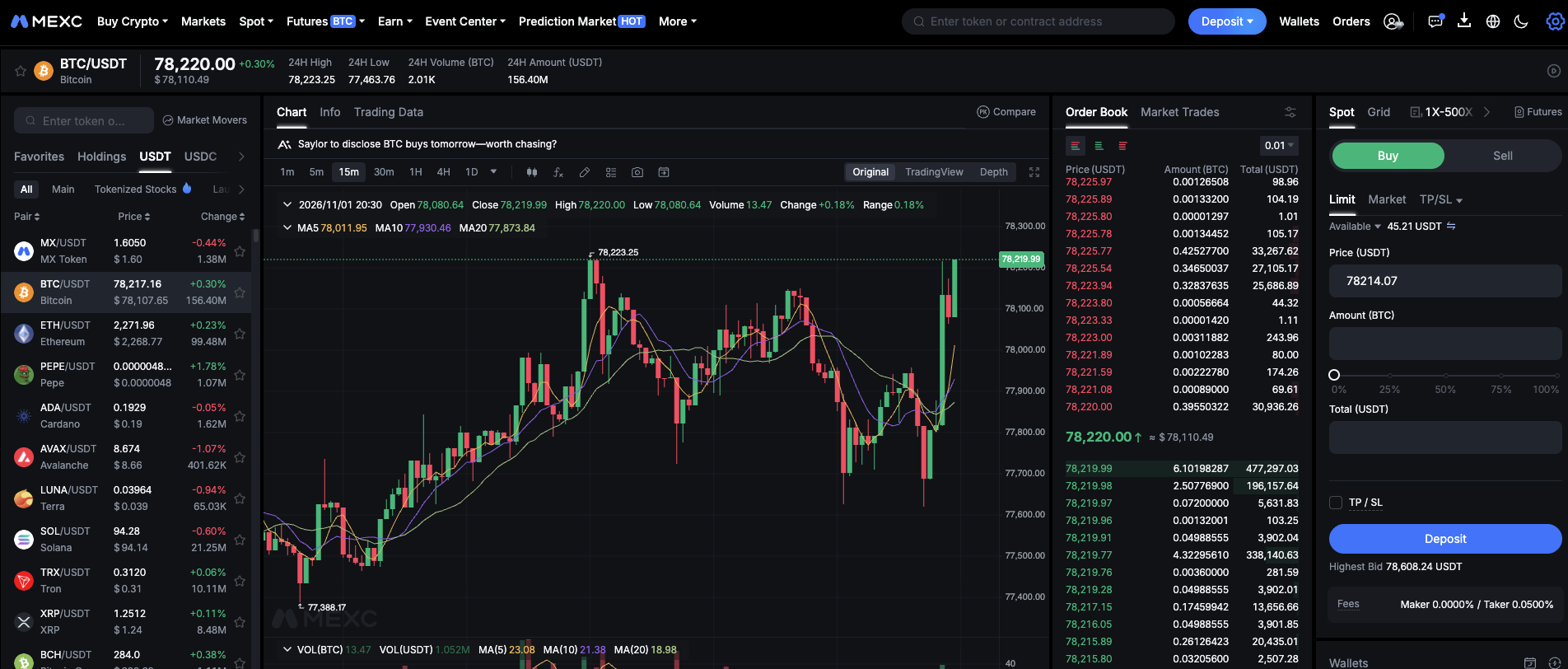
- 1The trading pair. In BTC/USDT you buy BTC (the first) paying with USDT (the second).
- 2Market buys right now at the best available price. Limit waits until the price reaches the value you choose.
- 3How much you want to spend. For a first purchase, a small amount is enough to learn the flow.
- 4The fee is shown before you confirm. Read it: it is part of the real cost of buying.
- 5Review everything and confirm. The purchase appears in your balance right away.
Fees are the real cost of buying. A platform charges a percentage of each trade (a "maker" fee when your order waits in the book, a "taker" fee when it matches an existing one immediately), and the difference between buy and sell prices (the spread) also works like a cost. As an illustration only: with a 0.1% fee, spending 100 USDT costs about 0.1 USDT in fees. Look at the actual figures shown before you confirm.
Safety Checklist
Most losses among beginners do not come from the market: they come from mistakes in the process. This list covers the ones that repeat the most.
Summary
- There are three common ways to buy: exchange, P2P and apps with built-in purchase. Each trades convenience, cost and risk differently.
- Crypto networks have no borders, but the companies offering services do: where they are based and who they serve matters.
- Paying with Pix does not make a service Brazilian. The payment may go to a third-party provider or to another person.
- A global platform does not report your operations in Brazil for you, so keeping your own records is part of the process.
- On an exchange, the balance is a claim on the company. Self custody starts when you move assets to your own wallet, which is the topic of a separate lesson.
- Secure the account before adding money: strong password, authenticator app and the extra protections offered.
- Pix, card and P2P differ in cost, limits and who receives the payment. Compare the total cost, not only the displayed fee.
- Card is usually the most expensive, and should never be paid with credit you cannot settle.
- Market orders are immediate. Limit orders wait for your price. Fees and spread are part of the cost.
Glossary
- Exchange
- A company that runs a marketplace where users buy and sell crypto.
- P2P (peer to peer)
- A purchase made directly from another person, with the platform holding the crypto in escrow.
- Escrow (garantia)
- Assets held by a third party until both sides of a trade fulfil their part.
- KYC
- Know your customer: identity verification required by a platform.
- 2FA
- Two-step verification: a second proof, such as a code from an authenticator app, besides the password.
- Trading pair
- Two assets traded against each other, such as BTC/USDT.
- Spot market
- The market where the real asset is bought and sold at the current price.
- Market order
- An order that executes immediately at the best available price.
- Limit order
- An order that executes only when the price reaches the value you set.
- Spread
- The difference between the best buy price and the best sell price.
- Maker and taker fees
- Percentage charged on trades: maker when your order waits in the book, taker when it matches immediately.
- Payment provider
- A third-party company that receives your Pix or card payment and delivers the crypto to your account.
- Withdrawal whitelist
- A list of pre-approved addresses; withdrawals can only go to them.
Quiz
Check your understanding of this lesson before moving on. Incorrect answers point you straight back to the relevant section.
This quiz is for practice and does not grant a badge. Badges are earned by completing the modules of Crypto A to Z.
1. In a P2P purchase, what does the platform do?
Correct, well done.
Not quite, review Ways to Buy and try again.
2. What does paying with Pix tell you about the service you are using?
Correct, well done.
Not quite, review No Borders and try again.
3. When you use a global platform with no link to Brazil, who keeps the record of your operations?
Correct, well done.
Not quite, review No Borders and try again.
4. Who controls the private keys of the assets while they are on an exchange?
Correct, well done.
Not quite, review How an Exchange Works and try again.
5. Why is an authenticator app preferred over SMS for two-step verification?
Correct, well done.
Not quite, review Account Setup and try again.
6. Which way of adding funds is usually the most expensive?
Correct, well done.
Not quite, review Adding Funds and try again.
7. What characterizes a limit order?
Correct, well done.
Not quite, review Spot Buying and try again.
8. In the pair BTC/USDT, what happens when you buy?
Correct, well done.
Not quite, review Spot Buying and try again.
9. When buying through a payment provider, where does part of the cost often hide?
Correct, well done.
Not quite, review Adding Funds and try again.
You scored 0 out of 9 correct.